 Dusk VM
Run Windows 11 on your Mac
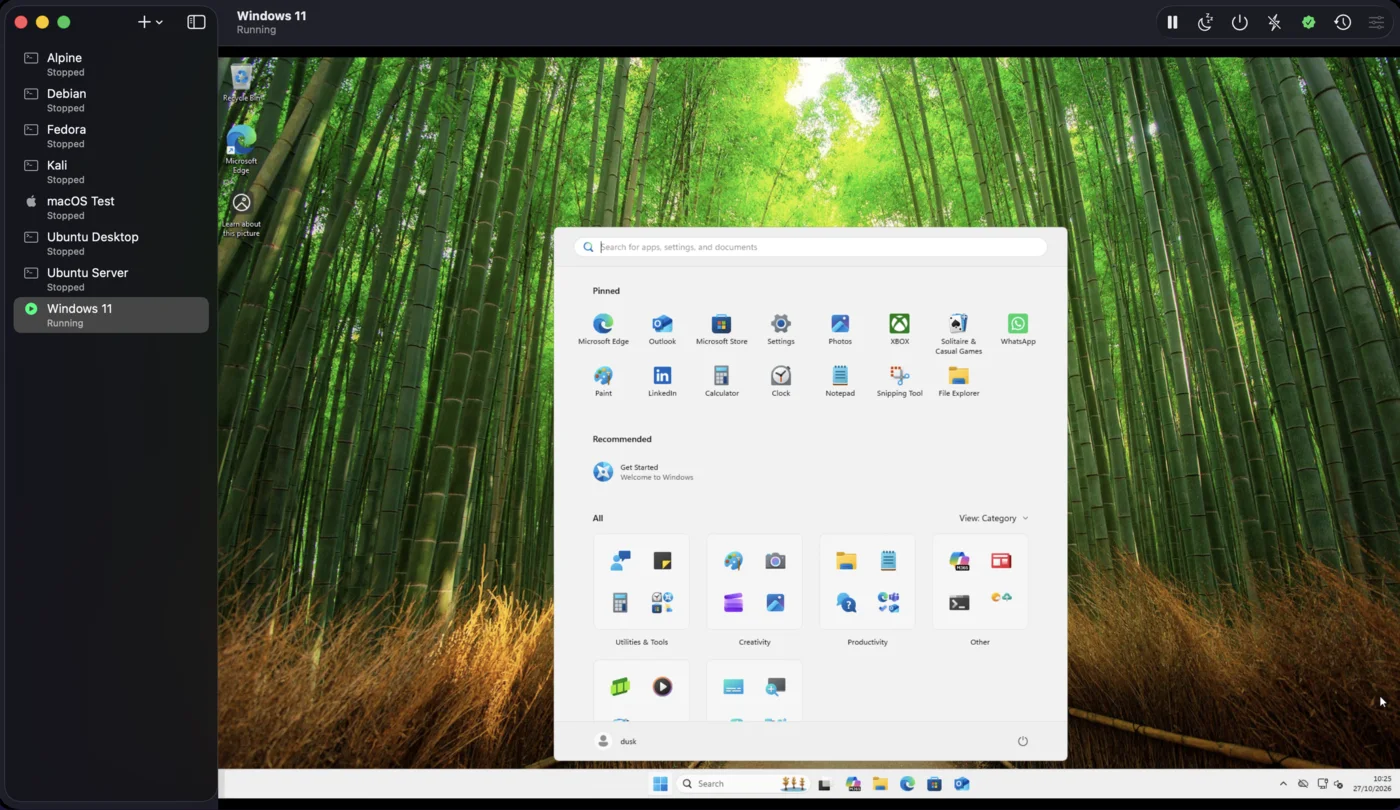
Apple silicon Macs have no Boot Camp, so Windows runs in a virtual machine: Windows 11 in a window of its own, beside your Mac apps. Dusk VM sets one up in a few clicks and installs Windows for you, with no questions along the way.
What you need
- A Mac with Apple silicon (M1 or later) on macOS 14 Sonoma or newer. Intel Macs aren't supported.
- Dusk VM for Mac. The free trial has every feature and needs no sign-up and no card.
- Microsoft's Windows 11 ISO for Arm64, from Microsoft's own download page. Dusk VM takes you to it.
- Your own Windows licence if you want to activate Windows. It installs and runs without one, unactivated, until you enter a product key in Windows Settings.
From download to the Windows desktop
Most of the work is waiting for Windows to install. Dusk VM answers Setup's questions for you.
-
Install Dusk VM
Download Dusk VM for Mac, open the disk image and drag the app to Applications.
-
Choose Windows 11
Open Dusk VM and press + for a new machine (the first time, Create Your First Virtual Machine). Choose Windows 11 from the list.
-
Get the ISO from Microsoft
Microsoft only offers the Arm64 version of Windows 11 from its own download page, so Dusk VM can't fetch it for you. Use Open Microsoft download page, download Windows 11 (multi-edition ISO for Arm64), then choose that file.
-
Let Express install do the rest
Pick Home or Pro and enter a name, a user name and a password. Windows partitions the disk, installs, creates your account and signs in, without asking questions. The small disc that carries your password is detached and deleted as soon as Windows is on the disk.
-
Start using Windows
Dusk VM Tools install themselves the first time you sign in, and keep themselves up to date. From then on the clipboard, your shared folder and the window size all work between your Mac and Windows.
Windows that feels at home on a Mac
- Shared clipboard: copy text on your Mac, paste in Windows, and back again.
- Shared folder: give Windows one of your Mac's folders, read-only if you prefer. It appears as drive
Z:. - A screen that fits: resize the window and Windows picks the largest resolution that fits it. Full screen gives Windows the whole display.
- Suspend and resume: suspend Windows and it resumes exactly where it left off, even after you restart your Mac.
- Snapshots with memory: take a snapshot while Windows runs, try the risky update, and go back if it goes wrong.
- Export and import: save a machine as one file and bring it back here or on another Mac.
- Your keyboard: the Command key acts as the Windows key, and Windows uses its own keyboard layout setting.
Windows runs on QEMU with Apple's hypervisor, and everything ships inside the app, so there is nothing else to install.
What it can't do yet
So you know before you start: Windows guests on a Mac have no sound, no drag and drop, no USB passthrough and no printing, and the shared clipboard is text only. Windows reaches the internet through your Mac (NAT); port forwarding connects a port on your Mac to one in Windows, and there is no bridged networking yet. The full list is under known limits, and the Windows 11 help has more detail on every step.
More guides
Good to know
Can I use Boot Camp on an Apple silicon Mac?
No. Boot Camp only exists on Intel Macs. On a Mac with Apple silicon, Windows runs in a virtual machine, which is what Dusk VM is for.
Do I need to buy Windows?
You need your own Windows licence to activate it. Express install chooses the edition with Microsoft's published generic key, which does not activate Windows, so Windows stays unactivated until you enter a real product key in Windows Settings.
Which version of Windows is it?
Windows 11 on Arm, the version of Windows made for processors like the one in your Mac. You download the multi-edition ISO for Arm64 from Microsoft and pick Home or Pro in Dusk VM.
Which Macs does it work on?
Any Mac with Apple silicon (M1 or later) on macOS 14 Sonoma or newer. Intel Macs aren't supported.
How do I move files between my Mac and Windows?
Give the machine a shared folder when you create it, or later in its settings. It appears in Windows as drive Z:. Text copies and pastes both ways through the shared clipboard.
What does Dusk VM cost?
The trial is free, with every feature, no sign-up and no card. After that, buy Standard once or subscribe to Pro: see pricing. One licence covers your Macs and your Windows PCs.
Try Windows 11 on your Mac, free.
Every feature, no sign-up, no card. When you're ready, buy it once or subscribe.