 Dusk VM
Run Linux on your Mac
Ubuntu, Fedora, Debian, Kali, Alpine or our own Dusk Linux, each in a window of its own on an Apple silicon Mac. Pick one from the catalogue and Dusk VM finds the newest Arm image on the publisher's own server, downloads it and starts the installer.
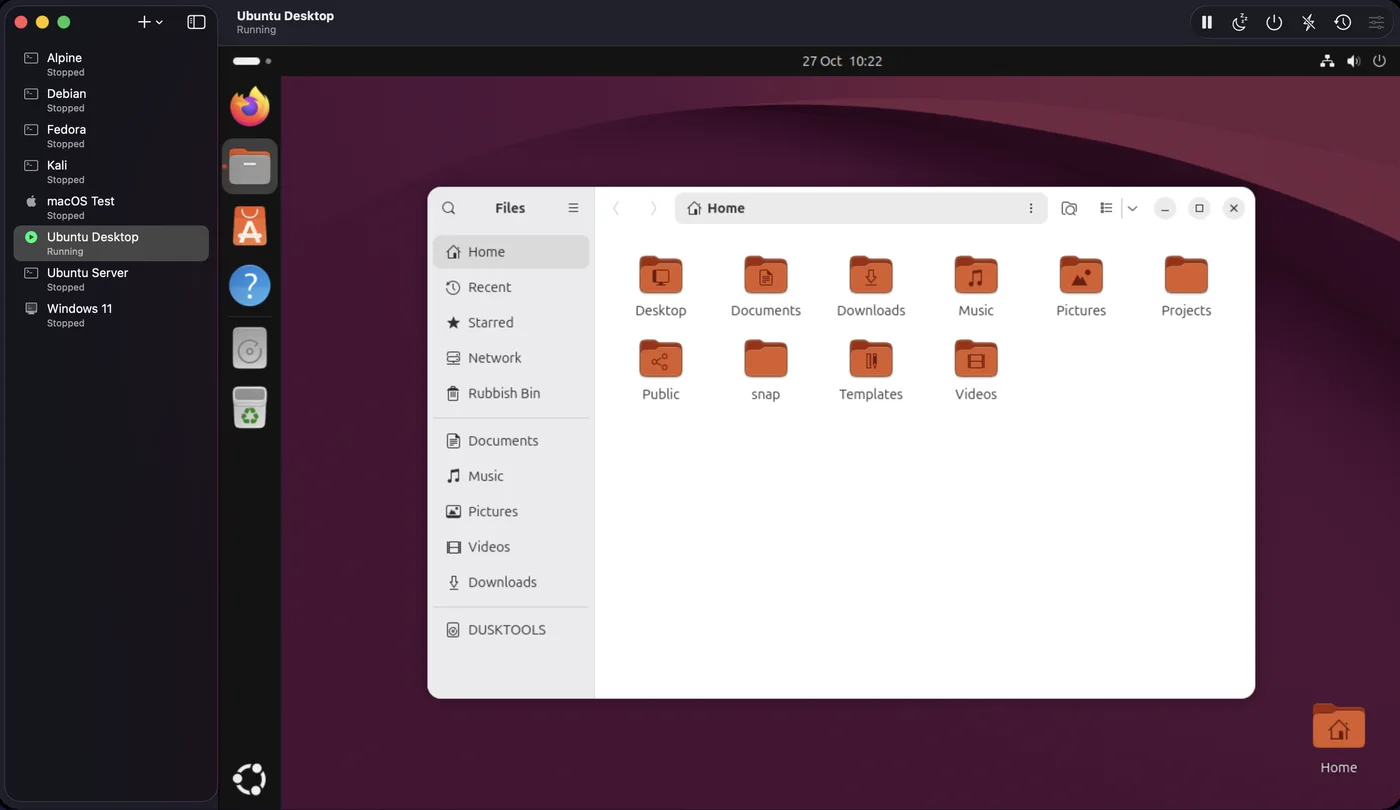
The catalogue
- Ubuntu Desktop and Ubuntu Server
- Fedora Workstation
- Debian, stable and dependable
- Kali Linux, for security testing
- Alpine Linux, small and quick to boot
- Dusk Linux Desktop and Dusk Linux Server, our own distribution on Debian 13, with Express install
- Your own image: any
.isobuilt for Arm
Each entry looks up the newest image on its mirror when you download, so new point releases need no app update. Images are kept and reused by your next machine.
What you need
- A Mac with Apple silicon (M1 or later) on macOS 14 Sonoma or newer. Intel Macs aren't supported.
- Dusk VM for Mac. The free trial has every feature and needs no sign-up and no card.
- Disk space for the machine. Its disk only takes the space Linux actually uses.
From download to a Linux desktop
A new machine in a few clicks. Dusk VM does the fetching.
-
Install Dusk VM
Download Dusk VM for Mac, open the disk image and drag the app to Applications.
-
Choose a system
Open Dusk VM and press + for a new machine (the first time, Create Your First Virtual Machine). Choose a system from the list, then set its name, CPUs, memory, disk size and an optional shared folder.
-
Let Dusk VM fetch the image
Dusk VM downloads the newest image from the publisher's own server, with progress, speed and time left, then starts the installer. Cancel leaves no half-finished file behind.
-
Install Linux
Follow the system's own installer. Dusk Linux installs itself: with Express install it writes the system to the machine's disk in about a minute, then Dusk VM ejects the disc and starts it.
-
Add Dusk VM Tools
Open a terminal inside Linux and run the one command below. It installs the clipboard agent and the shared folder client with the guest's own package manager: apt, dnf, apk, pacman or zypper.
sudo mount -o ro /dev/disk/by-label/DUSKTOOLS /mnt && sudo sh /mnt/install.shThe machine's idle screen in Dusk VM shows the same command with a Copy button.
Linux that feels at home on a Mac
- Shared clipboard: copy on your Mac, paste in Linux, and back again.
- Shared folder: give Linux one of your Mac's folders, read-only if you prefer. It is mounted at
/media/dusk-share, now and at every boot. - Display follows the window: resize the window and the Linux screen resizes with it, even before the tools are installed.
- Sound: Linux audio plays through your Mac's speakers.
- Suspend and resume: stop for the day and carry on tomorrow, right where you were.
- Snapshots: instant, and they share disk space until the disk changes. Taken while Linux runs, a snapshot keeps the memory too.
Each machine is one folder in your library, easy to find and back up. Export it as one file and import it on another Mac. Linux runs on QEMU with Apple's hypervisor, and everything ships inside the app.
What it can't do yet
So you know before you start: guests share your Mac's connection through NAT, so they reach the internet but other devices can't connect in to them. Port forwarding connects a port on your Mac to one in the guest, for example localhost:2222 to SSH on 22; there is no bridged networking yet. Sound is output only, with no microphone. The full list is under known limits, and the Linux guest help covers the tools in detail.
More guides
Good to know
Which Macs can run Linux with Dusk VM?
Any Mac with Apple silicon (M1 or later) on macOS 14 Sonoma or newer. Intel Macs aren't supported.
Can I run Intel (x86-64) Linux images?
No. Dusk VM runs systems built for your computer's kind of processor, so on a Mac you need Arm (arm64) images. Every system in the catalogue downloads as an Arm build.
Can I use an ISO I already have?
Yes. Choose Custom ISO or .ipsw… in New VM and point Dusk VM at any .iso built for Arm.
Where are my machines kept?
Every machine is a folder: ~/Library/Application Support/DuskVM/<name>.duskvm, holding its settings, a disk that grows as you use it and its snapshots. Snapshots live in the same folder, so copy important machines somewhere else too.
What is Dusk Linux?
Our own distribution, based on Debian 13, in Desktop and Server editions. Every image is checked against the SHA-256 we publish beside it before Dusk VM uses it. It is also free to download on its own from linux.duskengineering.services.
What does Dusk VM cost?
The trial is free, with every feature, no sign-up and no card. After that, buy Standard once or subscribe to Pro: see pricing. One licence covers your Macs and your Windows PCs.
Try Linux on your Mac, free.
Every feature, no sign-up, no card. When you're ready, buy it once or subscribe.